


UniProt Database User Guide: An Indispensable Bioinformatics Resource
 source:ELK Biotechnology
 date:2026-09-18
 views:345
UniProt Database User Guide: An Indispensable Bioinformatics Resource
Introduction
Proteins are the core functional molecules governing biological processes across life‑science research. As the world’s most authoritative and comprehensive database for protein sequences and functional annotations, **UniProt (Universal Protein Resource)** has become an essential tool for biomedical researchers. Whether you are a new lab member or an experienced principal investigator, proficiency in UniProt can significantly boost research productivity. This guide systematically outlines UniProt’s core capabilities and practical tips to take you from beginner to proficient user.
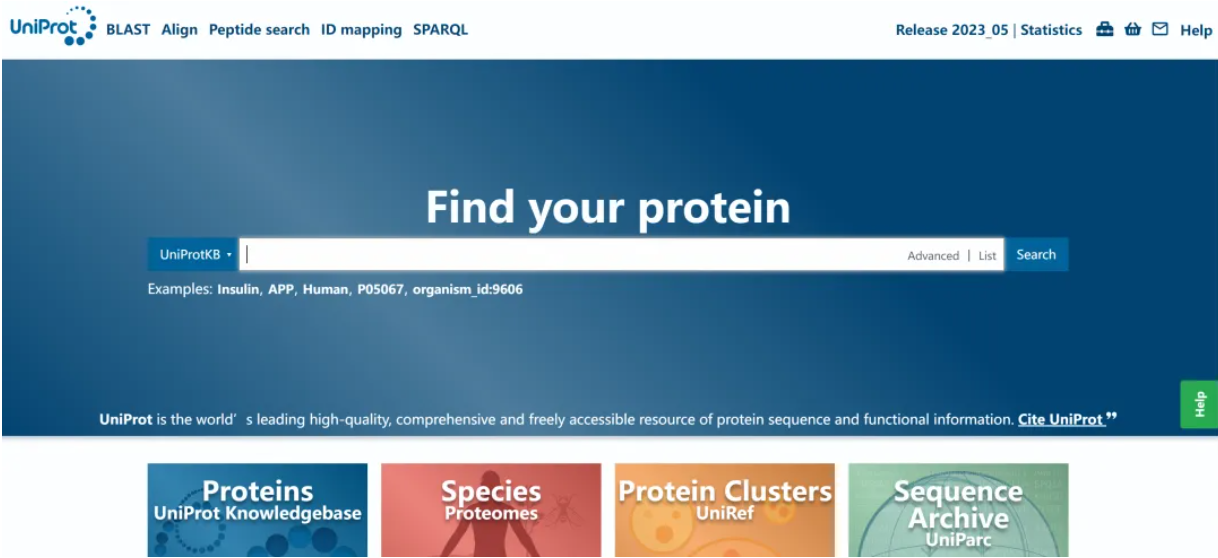
I. What is UniProt?
UniProt is jointly maintained by three leading institutions: the European Bioinformatics Institute (EBI), the Swiss Institute of Bioinformatics (SIB), and the Protein Information Resource (PIR). Its mission is to deliver high‑quality protein sequences and functional annotations for the global scientific community. It integrates multi‑source datasets derived from genome sequencing, structural biology, text‑mined literature and more. As of 2026, UniProt houses over 250 million protein sequences covering nearly all species from bacteria to humans.
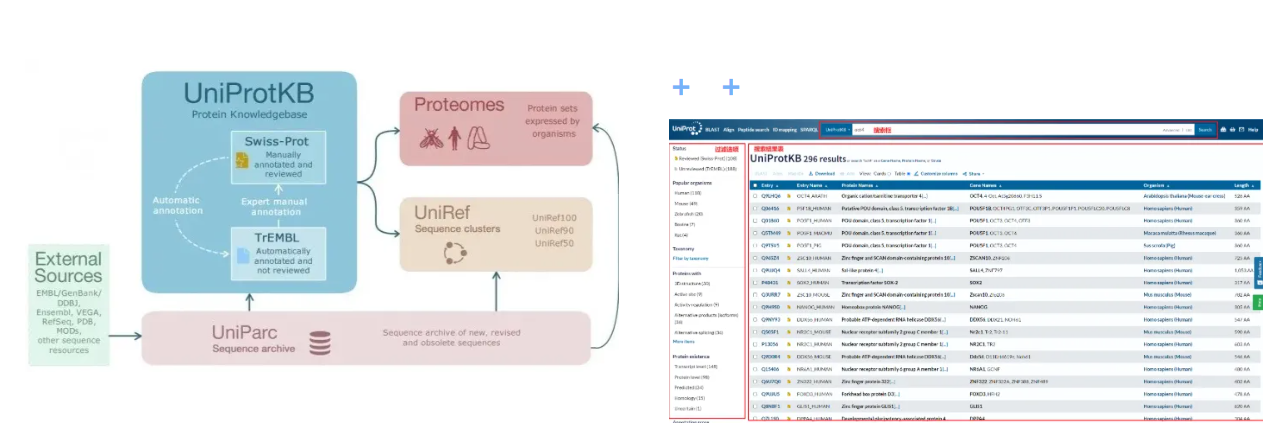
UniProt comprises three primary sub‑databases:
-UniProtKB (UniProt Knowledgebase) : Consists of manually curated *Swiss‑Prot* (≈570 000 entries, high‑confidence annotations) and automatically annotated *TrEMBL* (≈240 million entries generated by computational prediction).
-UniRef (UniProt Reference Clusters) : Groups highly similar sequences into clusters to reduce redundancy and facilitate large‑scale bioinformatic analyses.
- UniParc (UniProt Archive) : Stores all publicly available protein sequences and serves as a permanent sequence repository.
For routine research work, **UniProtKB**, particularly Swiss‑Prot entries, is most frequently used due to expert‑reviewed, high‑quality annotations.
II. Quick Search for Target Proteins
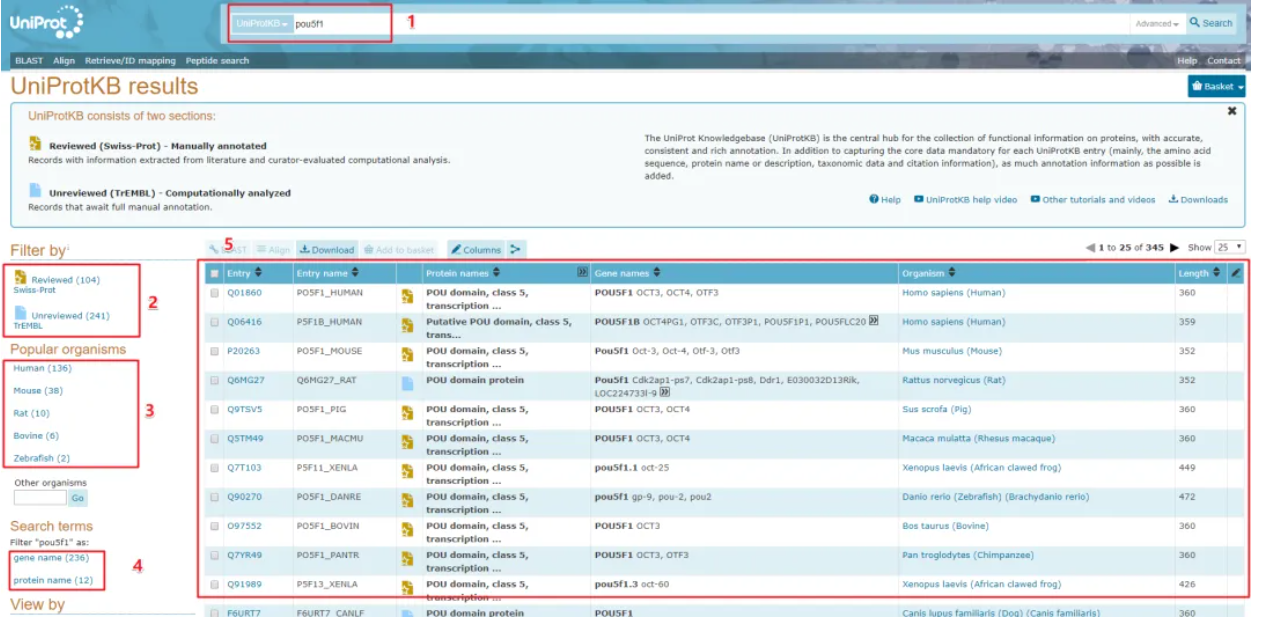
To retrieve information for human p53 protein (gene symbol *TP53*), navigate to the UniProt homepage ([www.uniprot.org](https://www.uniprot.org)). Enter search terms such as `TP53 human` or simply the gene name `TP53` in the search bar. Swiss‑Prot records, marked with a gold badge, are generally prioritized in result lists. Click the entry ID (e.g., P04637) to open the full‑detail page.
Key information modules within a UniProt entry:
1. Protein names & identifiers : Recommended protein name, gene symbol, organism, sequence length and other baseline metadata displayed at the top of the page.
2. Function**: Detailed descriptions of biological roles, participating metabolic pathways and catalytic activities. For example, p53 is annotated as a transcription factor regulating cell‑cycle progression and apoptosis.
3. Subcellular location: Reports protein compartmentalization. For instance, p53 predominantly resides in the nucleus and translocates to mitochondria under cellular stress.
4. Sequences & variants : Full amino‑acid sequence together with documented natural variants including cancer‑associated mutations.
5. Domains & sites : Annotates functional domains (e.g., the p53 DNA‑binding domain), active sites and post‑translational modification sites (phosphorylation, acetylation, and others).
6. Interactions : Lists experimentally verified interacting partners (e.g., MDM2, BAX for p53).
7. Expression & regulation**: Documents tissue‑specific expression patterns and transcriptional regulatory evidence.
8. Associated literature : PubMed references supporting annotation assertions.
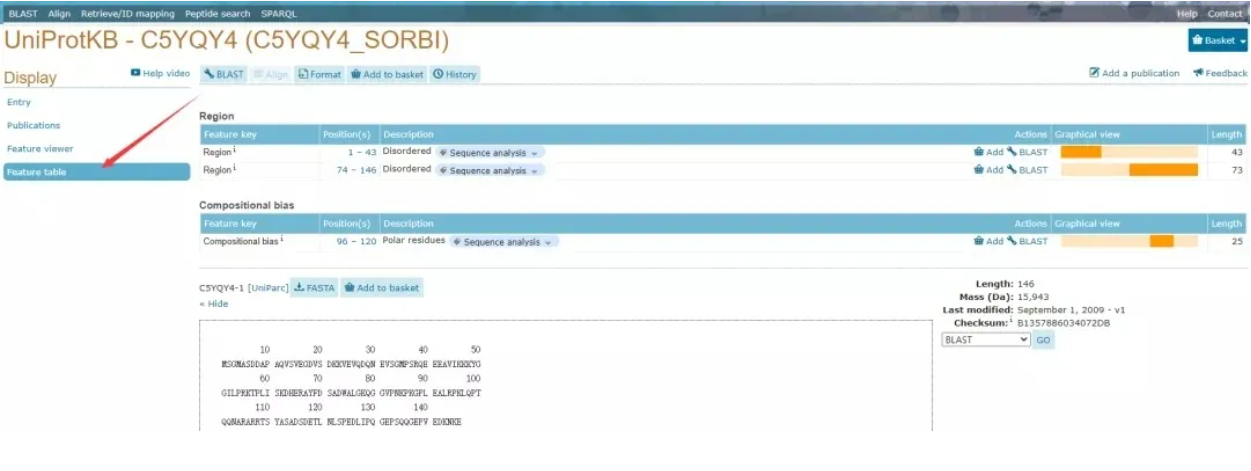
> Practical Tip: The **Feature viewer** panel on the right‑hand side visualizes annotated features mapped onto the protein sequence; click each feature to view supporting details.
III. Advanced Search: Precision Filtering for Target Datasets
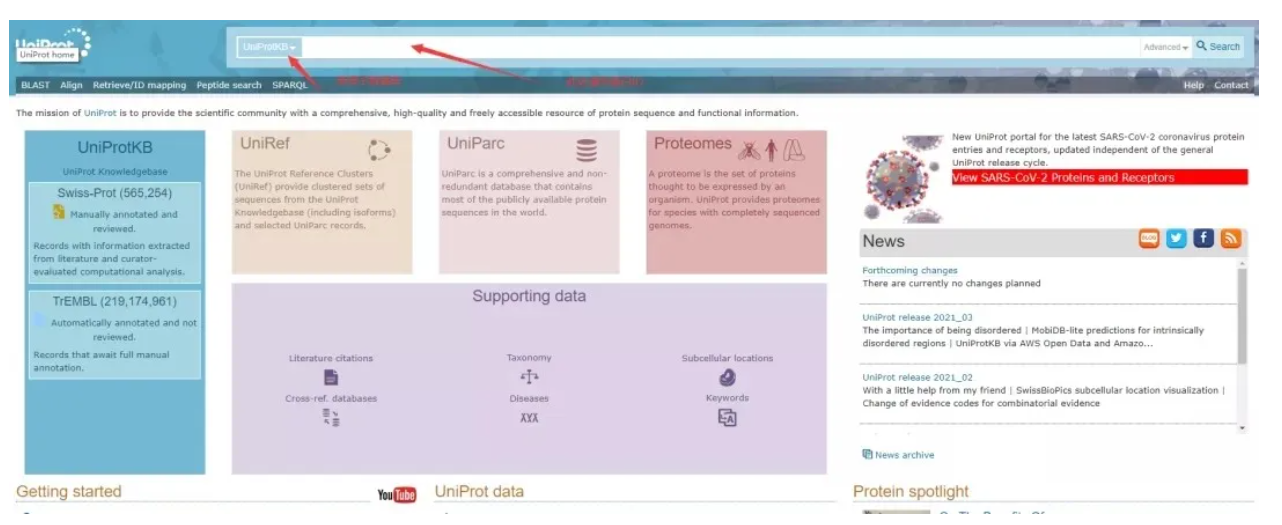
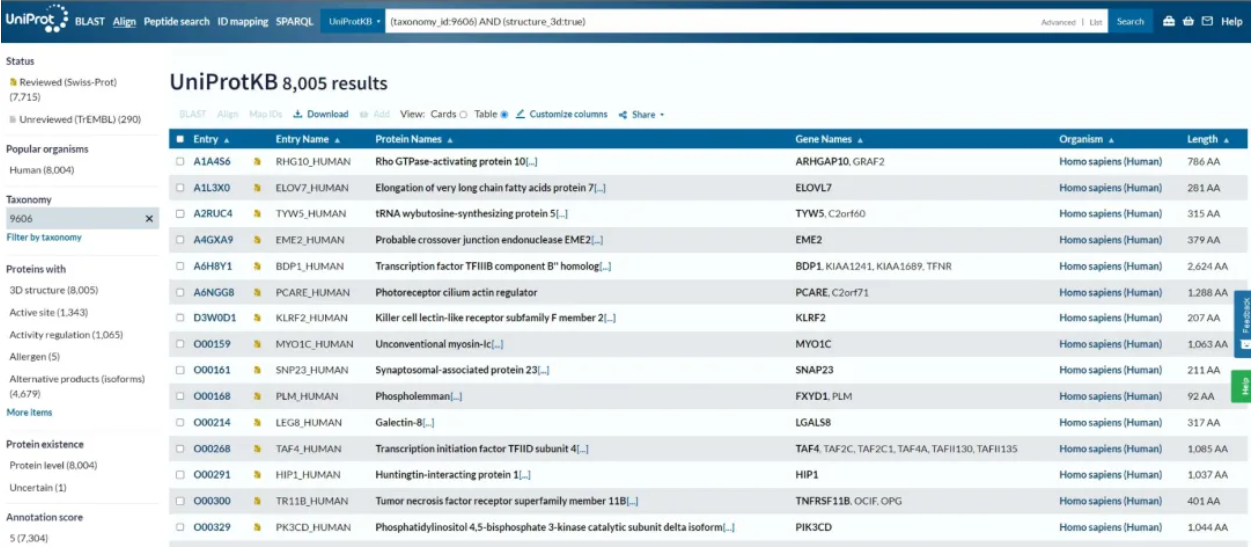
For batch queries or multi‑condition filtering, use UniProt’s powerful Advanced Search. Click the **Advanced** button below the search box to combine multiple search fields. Example field syntax:
- Gene name: `gene:TP53`
- Organism: `organism:"Homo sapiens"`
- Protein length: `length:[100 TO 500]`
- Functional keyword: `function:"DNA binding"`
- Protein domain: `domain:"P53 DNA‑binding domain"`
Case example**: Retrieve human transcription factors with protein lengths ranging from 300 to 500 amino acids. Enter the combined query:
`organism:"Homo sapiens" AND length:[300 TO 500] AND keyword:"Transcription factor"`
to generate a filtered result set.
UniProt supports Boolean operators (`AND`, `OR`, `NOT`) and wildcards. For example, searching `kinase` retrieves all kinase‑related entries.
IV. Sequence Alignment & Data Download: From Raw Data to Downstream Analysis
UniProt has a built‑in BLAST tool. Paste an uncharacterized protein sequence to search against the database for homologous sequences and infer potential biological functions.
Workflow: Click the **BLAST** button on the homepage, input your query sequence, select a target database (UniProtKB recommended), and submit your search. Results are sorted by sequence similarity with reported E‑values and alignment coverage.
Batch‑data download workflow
1. Add selected entries to your **Basket** (maximum capacity: 10 000 entries).
2. Open the basket icon in the top‑right corner and select **Download**. Export formats include FASTA for sequences and TSV for annotation tables.
3. For large‑scale bioinformatic pipelines, use the UniProt REST API (example endpoint: `https://rest.uniprot.org/uniprotkb/search?query=...`) for programmatic data retrieval.
V. Decoding Hidden Information within UniProt Entries
Many new users overlook critical metadata embedded in entries. Key points are highlighted below:
- Entry status: The gold badge denotes manually curated Swiss‑Prot; the blue badge marks computationally annotated TrEMBL. Prioritize Swiss‑Prot for research applications.
- Entry version: Each entry carries a version number (e.g., *Entry version 234*), which increments following sequence or annotation updates. Always cite the entry version in publications.
- Cross‑references: Hyperlinks at the bottom of each entry connect to external resources including PDB (protein structures), GeneCards (gene information), Reactome (biological pathways), and PubMed (literature), building an interconnected knowledge network.
- Disease‑linked variants: Navigate to the *Pathology & Biotech* section for documented pathogenic variants. For example, the R175H p53 variant frequently occurs across multiple human cancers.
- Alternative names: All known aliases for a given protein are listed to facilitate cross‑database searching.
VI. Frequently Asked Questions & Pro Tips
Q1: Why cannot I find a protein of interest?
A: Common causes include: ① incomplete genome assembly for the target organism; ② novel sequences not yet imported into UniProt; ③ inaccurate search keywords. Try searching with gene symbols, UniProt IDs, or performing a BLAST search using your protein sequence.
Q2: How should I cite UniProt datasets?
A: Locate the **Cite this entry** button at the bottom of each entry for entry‑specific citation formats. General publications referencing UniProt resources typically cite the UniProt Consortium review articles (e.g., *Nucleic Acids Res.*, 2025).
Q3: Where can I access 3D protein‑structure information?
A: Navigate to the **Structure** tab within an entry, which links to the PDB database. Experimental structures are displayed where available; AlphaFold predicted structures are also integrated within UniProt entries.
Q4: How can I perform batch functional analysis for multiple proteins?
A: Use the **Retrieve / ID mapping** tool. Upload a list of identifiers (gene names or UniProt IDs) and map them to target databases including GO, KEGG and InterPro to obtain functional‑enrichment outputs.
Q5: Does UniProt support a Chinese‑language interface?
A: UniProt’s official interface is English‑only. Browser translation plugins may assist reading; familiarity with standard English bioinformatics terminology is recommended for working with international public databases.
VII. Future Outlook: Integrating UniProt with Artificial Intelligence
Driven by rapid advances in artificial intelligence, UniProt continues to evolve. Since 2024, large‑scale integration of AlphaFold predicted structural models allows users to access high‑resolution 3D protein structures directly within UniProt entries. Deep‑learning‑driven functional predictors such as DeepGO and ProtNLM are improving the quality of automated annotations for TrEMBL records. In the near future, UniProt aims to deliver streamlined end‑to‑end interpretation workflows covering sequence, function, structure and molecular interactions, establishing itself as a comprehensive protein‑knowledge engine.
Conclusion
UniProt functions as an encyclopedic resource for protein biology. Its true value lies not only in data storage but also in effective utilization. From simple single‑protein queries to cross‑species comparative analyses and functional‑enrichment workflows, mastering UniProt elevates experimental design, data interpretation and manuscript preparation. We recommend hands‑on practice: search for a well‑studied protein, browse its full annotation record, and test advanced‑search and BLAST workflows. This freely accessible public resource delivers far greater capability than most researchers initially anticipate.

 RETURN